
















Introducing Tags and Smart Folders
Tag contacts and conversations in Herodesk, then use Smart Folders to group important work. Build useful support views without moving messages.
- Inbox
- Automation
We’ve created a video announcement of the two new features for the first time. You can see it at the bottom of this post.
Tags (also known as “labels”) can be associated with a contact or a conversation. You can create as many tags as you want, and you can associate them with as many contacts or conversations as you want.
For example, if you have a set of customers that are very important to you, you can create a “VIP”-tag and add it to those customers. Or if you need priority follow-up on certain conversations, you can create a “Follow-up”-tag and add it to those conversations.
That in itself doesn’t do much. But when combined with Smart folders, you get a super powerful feature that can help you in your daily work.
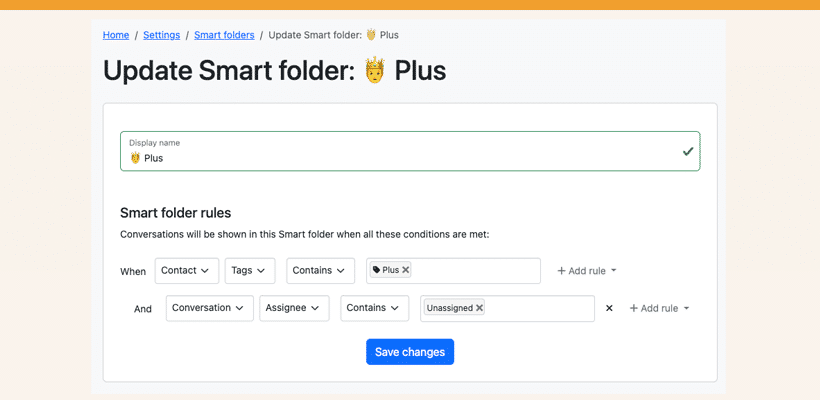
Smart folders are rule-based grouping of conversations. For each Smart folder you add, you define one or more rules to determine which conversations are put in them..
For example, you can create a rule saying that whenever a contact has the “VIP”-tag, their conversations should be added to the Smart folder. Or if a conversation has the “Follow-up”-tag, add it to the folder.
The list of possibilities is endless, and you can create as many Smart folders as you want for your business needs. For example:
- For E-commerce: Create a “Return”-tag and add it to conversations when the customer wants to return something. Create a Smart folder that contains conversations that have the tag “Returns”
- Follow-up: Not all tags have to remain forever. If you need to follow up with a group of customers whenever something happens (fx if a specific product gets back in stock), create a tag for the purpose, tag the conversations and have them easily available when you need to update the customers.
- General purpose: Feedback and reviews. Whenever a customer sends feedback, give it a label that matches to group them together, making them easy to find in the future.
You can create simple or complex rule sets depending on what you need. Rules can also be based on the subject of a conversation, the conversation assignee, or the e-mail address of a contact.
Let us know what you think and the different use cases you have where tags and smart folders can help.
Give your team time back
Start your free trial with free VIP onboarding. Meet a product specialist online and get personal help until everything is up and running to your satisfaction.

Ken Primby
CEO · Pluspige
From a Herodesk customer
4 to 6
hours saved on cleanup after live sales
Read the customer story“Herodesk brought all our channels together, saved us several hours of manual cleanup after our live sales and gave the team a clear overview.”