
















Inbox List Customization is here
Arrange inboxes and Smart Folders in the order that suits you in Herodesk. Hide the items you rarely use so the conversations that matter are easier to reach.
- Inbox
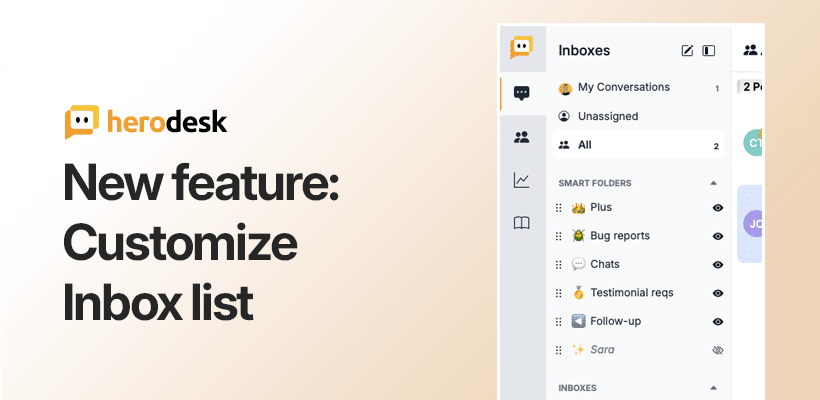
That’s why we’re excited to release a long-requested feature: Inbox list customization.
What’s new?
Every Herodesk account can contain multiple inboxes, smart folders and team members. Up until now, the inbox list in the sidebar was the same for everyone: same items, same order.
With today’s update, that changes.
Now, each team member can:
- Reorder their inboxes and smart folders
- Hide the ones that aren’t relevant to them
This means less visual clutter, faster access to what matters, and a better, more personal workflow for every user.
Why it matters
If you’re a small team with just a couple of inboxes, this might seem like a nice-to-have.
But for larger teams (especially those managing 10, 15 or more inboxes across different brands, channels or markets), this solves a daily frustration and helps everyone stay focused on the right conversations.
It’s a small detail. But it makes a big difference.
The new customization options are live for all users today.
To see it in action, simply hover over any inbox or folder in the sidebar and click the three-dot menu to reorder or hide items from your view.
Give your team time back
Start your free trial with free VIP onboarding. Meet a product specialist online and get personal help until everything is up and running to your satisfaction.

Ken Primby
CEO · Pluspige
From a Herodesk customer
4 to 6
hours saved on cleanup after live sales
Read the customer story“Herodesk brought all our channels together, saved us several hours of manual cleanup after our live sales and gave the team a clear overview.”